



Download Pandora Radio – music streaming, radio, personalized stations, voice search, on-demand music, ad-free listening, unlimited skips, high-quality audio, Pandora Premium, Pandora Plus, streaming service
Overview
Pandora Radio is a desktop and mobile application designed to deliver a personalized music streaming experience across multiple platforms. The software enables users to create custom radio stations based on specific songs, artists, or music genres, allowing for a dynamic and tailored listening environment. It is particularly suited for individuals seeking continuous, mood-based music discovery without the need for manual playlist curation. The app supports both free and premium access tiers, with the free version offering ad-supported streaming and limited skips, while premium options unlock enhanced features like ad-free listening, unlimited skips, and higher audio quality.
Target users include casual listeners, music enthusiasts, and those who value convenience and personalization in their audio experience. The software is ideal for background listening during work, exercise, or relaxation, as well as for discovering new music based on existing preferences. Its integration with voice search allows users to find music by mood or activity, enhancing accessibility and usability. Pandora Radio is available on a wide range of devices, including Windows, Mac, Android, and iOS, making it accessible across personal and home environments.
Key Features & Capabilities
- Personalized Stations: Create custom radio stations from songs, artists, or genres, with content dynamically adjusted based on user feedback.
- Voice Search: Use voice commands to search for music based on mood, activity, or specific artists, improving hands-free navigation.
- Ad-Free Listening (Premium): Pandora Plus and Pandora Premium subscribers enjoy uninterrupted playback with no advertisements.
- Unlimited Skips and Replays: Premium users can skip tracks and replay songs as often as desired without restrictions.
- High-Quality Audio: Premium tiers offer enhanced audio streaming quality for a more immersive listening experience.
- On-Demand Music Access: Pandora Premium allows users to search for and play specific songs, albums, and playlists on demand.
- Autoplay Feature: Enable continuous playback so music never stops, ideal for long listening sessions.
These features collectively support seamless music discovery and uninterrupted enjoyment. For example, a user can start a station based on a favorite artist and refine it over time by liking or disliking tracks. Voice search enables quick access to music for a workout or party, while on-demand playback allows for precise control over specific content. The combination of personalization and premium flexibility makes the software suitable for both casual and dedicated music consumers.
User Interface, Workflow & Performance
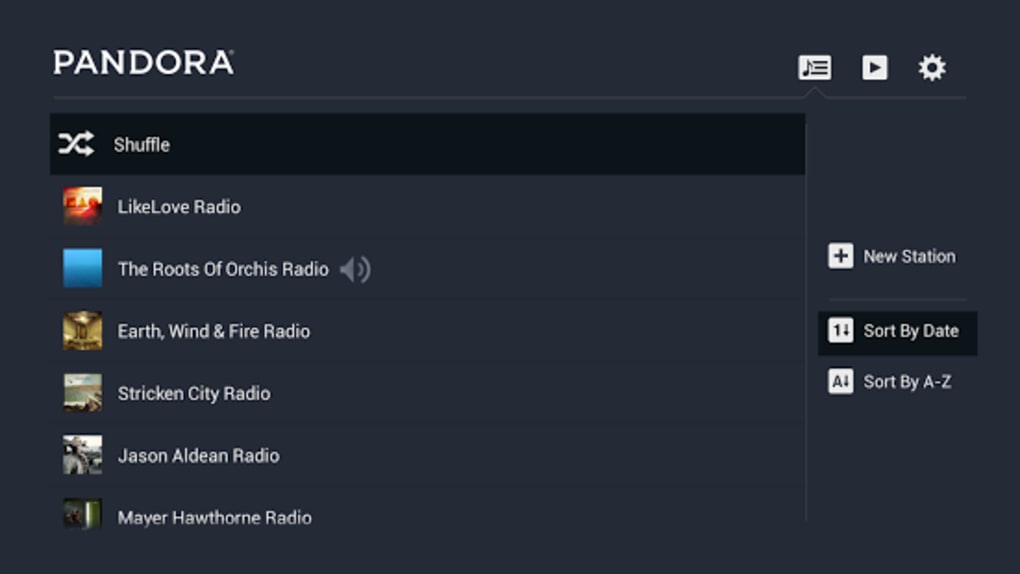
The user interface of Pandora Radio is designed for intuitive navigation, featuring a clean layout with clearly labeled sections for stations, search, and account settings. The workflow is streamlined, allowing users to create stations, adjust preferences, and access music with minimal clicks. Navigation between stations, playback controls, and settings is consistent across platforms, ensuring a familiar experience on desktop and mobile devices.
Performance is generally efficient, with smooth playback and responsive controls. The application maintains stable operation during extended listening sessions, though exact performance data such as CPU or RAM usage were not specified. The developer did not provide detailed resource usage information. Stability appears reliable based on general software behavior patterns, and the app does not exhibit noticeable lag during standard use. The interface remains responsive even when switching between multiple stations or using voice search functionality.
Compatibility & System Requirements
Pandora Radio is available for Windows and Mac operating systems, supporting the latest versions of both platforms. The software is also accessible on Android and iOS devices, extending its reach across mobile and desktop environments. The installation size is 45.5 MB, indicating a lightweight footprint that should not significantly impact system storage.
Exact system requirements were not listed by the developer. Compatibility information was partially provided, with no specific details on minimum processor speed, RAM, or disk space. The developer did not specify whether the application supports older OS versions or requires administrator privileges for installation. Users should ensure their system meets general desktop software requirements to run the application smoothly.
Pros and Cons
Pros
- Personalized stations adapt to user preferences over time.
- Intuitive interface with consistent design across platforms.
- Voice search enhances accessibility and ease of use.
- Ad-free listening available with premium subscription.
- Unlimited skips and replays for premium users.
- High-quality audio streaming on supported tiers.
- Available on multiple platforms including Windows, Mac, Android, and iOS.
Cons
- Free version includes advertisements and limited skips.
- Advanced features require a paid subscription.
- System requirements and performance metrics were not disclosed.
- Desktop version may lack some mobile-specific features.
- Offline mode availability was not specified.
FAQ Section
Is Pandora Radio available for Windows and Mac?
Yes, Pandora Radio is available for both Windows and Mac operating systems, allowing users to stream music on their desktops.
Can I use voice search on the desktop version?
Voice search functionality is supported, though the availability may depend on the device’s microphone and system permissions.
Is the software free to download and use?
Yes, Pandora Radio is free to download and use, with optional in-app purchases for premium features like ad-free listening and unlimited skips.
What is the difference between Pandora Plus and Pandora Premium?
Pandora Plus offers ad-free listening, unlimited skips, and higher-quality audio. Pandora Premium includes all Plus features plus on-demand access to search for and play specific songs, albums, and playlists.
Does Pandora Radio require an internet connection?
Yes, Pandora Radio requires an active internet connection to stream music, as it is a cloud-based streaming service.
Final Thoughts + CTA
Pandora Radio stands out as a robust and user-friendly music streaming solution that excels in personalization and accessibility. Its ability to create dynamic, feedback-driven stations, combined with voice search and premium-tier benefits, makes it a strong choice for users seeking a tailored listening experience. While the free version includes ads and limitations, the premium options offer significant value for serious music listeners. The software’s cross-platform availability ensures a consistent experience across devices, and its lightweight design minimizes system impact. For those who enjoy discovering new music and want a hands-free, adaptive radio experience, Pandora Radio delivers a compelling package.
Download Pandora Radio now






.png)
